More than a reader.
A connected library.
The Bible is the heart of the app. A carefully integrated collection of study tools lets you move from a verse to a person, a journey, an insight or a note without losing your place.
Every book.
Any chapter.
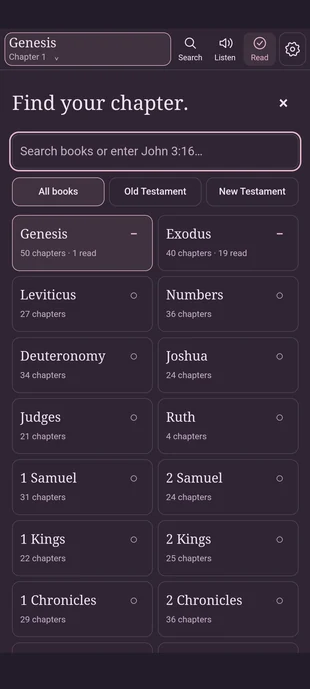
This is the real chapter picker from Android 1.5.3. It lets you search Bible books, filter Old and New Testaments, and choose a chapter while showing completed reading progress.
Find a book by name or jump straight to a passage reference.
See completed chapters in the picker and continue where you left off.
Search, Listen, Read / Unread and Settings sit on the main toolbar.
Remember more than
a chapter number.
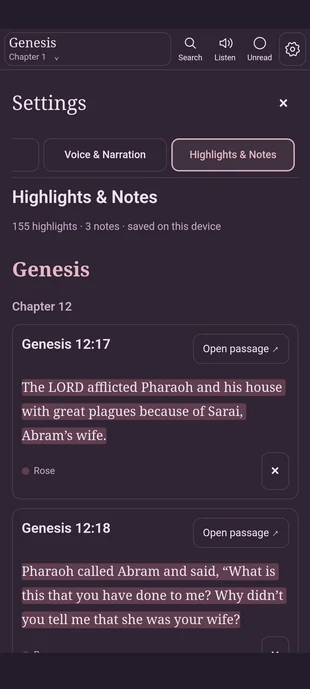
Highlights can cover the exact text you select and be revisited later. The app's saved Highlights & Notes panel shows the passage reference, highlight color, quotation and a shortcut back to the chapter.
Mark text in different colors, including Rose.
Keep your observations alongside the passage you were reading.
Export and import supported highlights, notes, bookmarks and progress. Local data stays on your device unless you choose to back it up.
The screenshot shows personal study content stored in the supplied APK installation; the website does not claim to synchronize or access your personal data.
More control,
without the clutter.
These are functional controls verified from the APK and source; detailed interactive showcases are on their own pages.
Reading appearance
Text size, line spacing, reading width, typeface and 12 selectable page palettes.
See the exact theme options ↗Audio and follow-along
Offline Piper voice support in the supplied build, voice controls, speed adjustment and spoken-text highlighting.
Play the genuine narration sample ↗Study in context
Navigate biographies, family relationships, Bible passage evidence, maps, timelines and nations.
Explore sourced records ↗Offline reading and signed updates
A complete 66-book Bible and study content are bundled for offline Android use. Signed reading updates and native APK releases are separate.
Read about updates and backups ↗A richer way to
read and discover.
Start in your browser now, or install the official Android app for mobile-first offline reading.