Listen to the Word.
Stay with the story.
Narration is part of the reading experience, bringing spoken Scripture alongside the text. The supplied Android 1.5.3 build includes an offline Piper voice model; speech options can differ between Android releases.
Meet Robin.
Hear the real synthesis.
The provided Android 1.5.3 APK contains an offline Piper LibriTTS-R model with 904 speaker IDs. Its code labels speaker 200 as Robin. The playable recording is generated by Piper using the upstream LibriTTS-R model with speaker 200. The APK bundles the same model family, but its model binary is not identical to this public reference. This is real synthesis, not an imitation or a browser voice.
- Bundled offline neural narration in the supplied 1.5.3 APK
- Robin is Piper speaker 200 in that build
- Available speeds and spoken-text highlighting in the app
- Resume and playback controls from the reader
Public APK downloads currently follow the official release feed, which may have an older Android version than this supplied build.
Robin · English (US)
Actual Piper synthesis with speaker 200, the speaker index labeled Robin in your APK. The public upstream model was used to make this recording.
Genesis 1:1–2 · World English Bible · Piper LibriTTS-R medium, speaker 200. Uses the upstream public model from the same LibriTTS-R family; not the APK's exact ONNX binary. No substitute browser TTS.
Piper model and credits ↗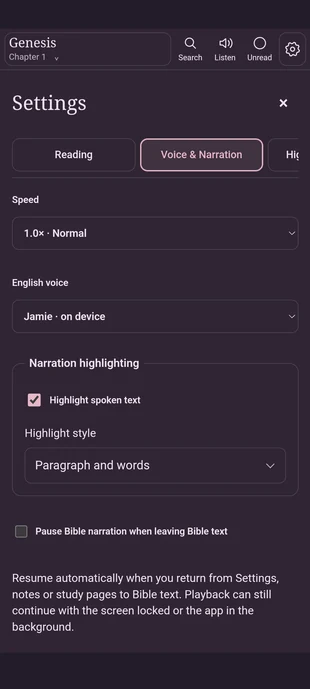
Make every word
easier to follow.
Choose available voices, adjust speed, and enable spoken-text highlighting. The supplied settings screenshot shows Jamie selected as an on-device voice; the audio demo above separately features Robin from Piper.
The screenshot shows Normal at 1.0×, with speed adjustable inside the app.
Enable highlighting so the on-screen text follows narration where supported.
The native Android narration service provides foreground playback and a notification while listening outside the reader.
Individual voice choices vary by installed version, device and available speech engines. This screenshot does not claim that Jamie is the Piper Robin voice.
Some chapters are better
heard aloud.
Download the Android application to explore local narration, or open the web reader to see the full reading experience.